-> Constraint Influence Ipo now can be local, linked to constraint itself

You enable this in the IpoWindow header, with the Action icon to the left
of the Ipo Type menu. The button tooltips give the clue as well.

Tech note: the Ipo now can get directly linked to a constraint, and is
being called during regular pose constraint solving.
Actions (and drivers in actions) are being calculated *before* pose
constraint solving. Result of actions then is written in bones, which
then solves the entire pose.
This means you can have a driver on both the constraint, as on the action
channel for the constraint! Not that I'm going to debug that easily :)

Additional fix: Joshua added a copy/paste IpoCurve feature, but he broke
the functionality to be able to paste in an empty ipo channel. That now
works again
Patch by: Matt Ebb (broken)

Currently in Blender, NLA action modifiers can work in very wacky and mysterious ways.

If an action is being modified with a path deform, when it reaches the end of that strip, it will snap back to the original un-modified location, regardless of whether the strip 'Hold' option is on. It's very frustrating to work with, and causes all sorts of problems - if you use a path to make a character walk from point A to point B, you generally want him to stay at point B, and not jump somewhere completely different, just because the strip ended.

This patch fixes this behaviour, and makes it much more sensible and predictable. There is a chance that this will break old files that were reliant on the old broken behaviour though, but I think it's definitely worthwhile to fix this problem.

Check the demo file in Blender 2.45 vs one with this patch applied - you can see the difference in behaviour.

Demo File Link (attachment in original tracker post):
https://projects.blender.org/tracker/download.php/9/127/7779/4856/wheelsetup2.zip
- error fix: overall weight group value was used inverted
- added "Inv" button to make weight group work inverted
- added bigger, more clear Multi Modifier button
This allows to mix between the result of 2 modifiers, with both
using the same input state. This is useful for having a mesh deform
and armature deform working together.

However! This functionality could have been presented better...
this is actually Node editor stuff!

Now it works by adding a "MM" button, next to the "overall vgroup"
option. If MM is pressed, the input of this modifier is the same as
the input of the previous modifier.
Only the armature modifier has this option now...
B-bones didn't work well with non-uniform scaling applied to them.
The code to solve this is not too pretty, but don't know how to do
it simpler, and at least it makes that stretchy spine work.
==

Solving is now done independent of scale, by scaling the chain to have a
size of about 1.0. This solves some issues with small or big chains, and
also makes the IK stretch setting independent of scale. The latter breaks
backwards compatibility somewhat, but is an improvement over what it did
before.
Once again, I've recoded the constraints system. This time, the goals were:
* To make it more future-proof by 'modernising' the coding style. The long functions filled with switch statements, have given way to function-pointers with smaller functions for specific purposes.
* To make it support constraints which use multiple targets more readily that it did. In the past, it was assumed that constraints could only have at most one target.

As a result, a lot of code has been shuffled around, and modified. Also, the subversion number has been bumped up.

Known issues:
* PyConstraints, which were the main motivation for supporting multiple-targets, are currently broken. There are some bimport() error that keeps causing problems. I've also temporarily removed the doDriver support, although it may return in another form soon.
* Constraints BPy-API is currently has a few features which currently don't work yet
* Outliner currently only displays the names of the constraints instead of the fancy subtarget/target/constraint-name display it used to do. What gets displayed here needs further investigation, as the old way was certainly not that great (and is not compatible with the new system too)
B-Bones already deformed the mesh in the armature rest position, which is
unconvenient. For backwards compatibility existing .blend files still have
a button for the old behavior enabled.

(peach feature request)
bsystem_time was being called with an extra variable, which was useless. Most of the places that called it, were passing NULL for that variable anyway.

I've also cleaned up that function a bit, but the underlying problems with that part of the code still exist (EVIL GLOBALS that are exported for frame_to_float), for mblur and fields rendering features. That remains for another time.
===============================

This is a new armature deform interpolation method using Dual Quaternions,
which reduces the artifacts of linear blend skinning:

http://www.blender.org/development/current-projects/changes-since-244/skinning/

Based on the paper and provided code:

Skinning with Dual Quaternions
Ladislav Kavan, Steven Collins, Jiri Zara, Carol O'Sullivan.
Symposium on Interactive 3D Graphics and Games, 2007.
===============================

An improved CrazySpace correction is now used for Armature modifiers that use
vertex groups, and that are the first enabled modifiers in the stack. This is
a a specific case, but also a common one.

http://www.blender.org/development/current-projects/changes-since-244/skinning/

Implementation Notes:

- The quaternion crazyspace correction is still used for modifiers other than
  the armature modifier.
- Modifiers can now provide a deform matrix per vertex to be used for
  crazyspace correction, only the armature modifier implements this now.
After just over a week of coding, I've finished doing a major refactor/cleanup of the constraints code. In the process, quite a few old kludges and ugly hacks have been removed. Also, some new features which will greatly benefit riggers have been implemented.

=== What's New ===
* The long-awaited ``ChildOf Constraint'':
This allows you to animate parent influences, and choose which transformation channels the parent affects the child on (i.e. no translation/rotation/scaling). It should be noted that disabling some combinations may not totally work as expected. Also, the 'Set Inverse' and 'Clear Inverse' buttons at the bottom of this constraint's panel set/clear the inverse correction for the parent's effects. Use these to make the owner not stick/be glued to the parent.
* Constraint/Target Evaluation Spaces:
In some constraints, there are now 1-2 combo boxes at the bottom of their panel, which allows you to pick which `co-ordinate space' they are evaluated in. This is much more flexible than the old 'local' options for bones only were.
* Action Constraint - Loc/Rot/Size Inputs
The Action Constraint can finally use the target's location/rotation/scaling transforms as input, to control the owner of the constraint. This should work much more reliably than it used to. The target evaluation should now also be more accurate due to the new space conversion stuff.
* Transform - No longer in Crazy Space (TM)
Transforming objects/bones with constraints applied should no longer occur in Crazy Space. They are now correctly inverse-corrected. This also applies to old-style object tracking.

=== General Code Changes ===
* solve_constraints is now in constraints.c. I've removed the old `blend consecutive constraints of same type' junk, which made the code more complex than it needed to be.
* evaluate_constraint is now only passed the constraint, and two matrices. A few unused variables have been removed from here.
* A tempolary struct, bConstraintOb, is now passed to solve_constraints instead of relying on an ugly, static workobject in some cases. This works much better.
* Made the formatting of constraint code consistent
* There's a version patch for older files so that constraint settings are correctly converted to the new system. This is currently done for MajorVersion <= 244, and SubVersion < 3. I've bumped up the subversion to 3 for this purpose. However, with the imminent 2.45 release, this may need to be adjusted accordingly.
* LocEulSizeToMat4 and LocQuatSizeToMat4 now work in the order Size, Rot, Location. I've also added a few other math functions.
* Mat4BlendMat4 is now in arithb. I've modified it's method slightly, to use other arithb functions, instead of its crazy blending scheme.
* Moved some of the RigidBodyJoint constraint's code out of blenkernel, and into src. It shouldn't be setting its target in its data initialisation function based + accessing scene stuff where it was doing so.

=== Future Work ===
* Geometry to act as targets for constraints. A space has been reserved for this already.
* Tidy up UI buttons of constraints
Patch by Juho Vepsäläinen (bebraw)
[ #5850 ] Inverted axis' buttons to Copy Rotation and Copy Location constraints

This patch adds the options to invert the value being copied from each axis of the Copy Rot/Copy Loc constraints.


This commit also includes some slight code sanitization and tool tips cleanup (for the two track constraints, the tool tips were really unuseful).
When rotating bones around the 3d-cursor in posemode with a rotated
armature, rotation was around strange points other than the cursor.

This bug has been around for quite a few releases now. Somehow, the
maths used to convert the world/global space locations to local locations
only worked on things in editmode, but not bones.
When weights in Meshes are extremely small (< 0.01) normalizing them
can give overflows, thanks to float precision limit.
This is still unsolved, but for now the limit had to be set smaller...
(reason is that Plumiferos uses mixed lattice and vertex-group deform)

Also: running Blender in debug (-d) will print subversion now.
Moved function used for 'Visual' keyframing, to live with the rest of the
API calls I added for Pose-Mode bone snapping. Now, it is in a more
'releasable' state.
IK Locks/Limits were applied to bones in IK-chains even when the IK
constraint for the chain had an influence value of 0.

I've added a check to see if the ik-constraint found has any influence
over a chain, before the chain is made available for ik-solving.
Now the Snap To Location (Shift S) tools for bones in pose-mode
work correctly. Previously, only one of these tools was implemented,
but it only worked in some cases.


This fixes item #4874 in Todo Tracker. Was patch #5012.
* Patch #5442: "Fix Bone SizeLimit" by Heriberto Mendez (gammarayq21)
'Limit Scale' constraint can now work on bone's local scaling too.

* I've also made the 'Copy Scale' constraint able to use the local scaling
of bones too.
didn't keep in mind the pose channels could change order...

Note the disabled code in readfile.c; will be finished later. It's for
debugging library dependencies.
The first incarnation assumed that proxies were local objects per
definition. Unfortunately that makes it impossible to - for example -
reference-link an entire Scene with proxies, to be used as a special
character set.

This commit makes the proxy implementation also a bit more clear.

Related work: the scene-sets were not executed fully or correctly for
the dependency graph. That happens now (in 3d view) as well.
2006/11/19 00:07:32 CET
Fix for bug #5250: inaccurate conversion between edit and pose mode bones.

Two very bad bugs:
- replacing atan() with atan2() should also remove the M_PI correction!
  This is the equivalent:
    angle=atan(x/y); if(y<0) angle+=M_PI;
    angle= atan2(x, y);

- the new NormalizedVecAngle2() call was negating an input vector, causing
  calling code to screw up. All arithb.c calls should not alter input.
Yesterday's commit from Brecht broke armature editmode, damaging armatures
in a way you cannot rescue. This rewinds the main changes. After commit
I'll try to find the error...
All data layers, including MVert/MEdge/MFace, are now managed as custom
data layers. The pointers like Mesh.mvert, Mesh.dvert or Mesh.mcol are
still used of course, but allocating, copying or freeing these arrays
should be done through the CustomData API.

Work in progress documentation on this is here:
http://mediawiki.blender.org/index.php/BlenderDev/BlenderArchitecture/CustomData


Replaced TFace by MTFace:

This is the same struct, except that it does not contain color, that now
always stays separated in MCol. This was not a good design decision to
begin with, and it is needed for adding multiple color layers later. Note
that this does mean older Blender versions will not be able to read UV
coordinates from the next release, due to an SDNA limitation.


Removed DispListMesh:

This now fully replaced by DerivedMesh. To provide access to arrays of
vertices, edges and faces, like DispListMesh does. The semantics of the
DerivedMesh.getVertArray() and similar functions were changed to return
a pointer to an array if one exists, or otherwise allocate a temporary
one. On releasing the DerivedMesh, this temporary array will be removed
automatically.


Removed ssDM and meshDM DerivedMesh backends:

The ssDM backend was for DispListMesh, so that became obsolete automatically.
The meshDM backend was replaced by the custom data backend, that now figures
out which layers need to be modified, and only duplicates those.


This changes code in many places, and overall removes 2514 lines of code.
So, there's a good chance this might break some stuff, although I've been
testing it for a few days now. The good news is, adding multiple color and
uv layers should now become easy.
Using acos(dot(u, v)) to find the angle between two vectors is quite
inaccurate, and there's a better way to do it, as explained here:
http://www.plunk.org/~hatch/rightway.php

Also changed the use of atan for computing roll to atan2 in some places,
the latter avoids accuracy and division by zero issues.
Log again:

 Log:
  1)
  Bugfix: Beziers in curve didn't calculate the tilt values correctly for
  the endpoint and not for all handle types. That way deforming curves didn't
  extend the tilted deform either. (IRC report by Jahka)

  2)
  If you setup a Proxy for Armatures, the protected bones now have an error
  pupup for buttons and for some of the tools in 3d window (constraint edit
  mostly).
  Also the Bones Panel shows a note when the bone is not editable.
THE OBJECT PROXY

Or simple said; local control of referenced data from libraries.
Having library files with references is a very common studio setup, and
Blender did do quite well in that area. Were it not that for character
setups it was impossible to use still.

This commit will enable a full rig+character to remain in the library,
and still have - under strict control - local access for animation edits.

Full log:
http://www.blender3d.org/cms/Proxy_Objects.824.0.html
- FORWARD CYCLING & MATCHING

Up to no now, adding multiple actions in NLA with walkcycles required to
animate them standing still, as if walking on a conveyor belt. The stride
option then makes the object itself move forward, trying to keep the foot
stuck on the floor (with poor results!).
This option now allows to make walk cycles moving forward. By
indicating a reference Offset Bone, the NLA system will use that bone to
detect the correct offset for the Armature Pose to make it seamlessly going
forward.

Best of all, this option works as for cyclic Action Strips as well as for
individual Action Strips. Note that for individual strips, you have to set
the strip on "Hold". (Might become automatic detected later).

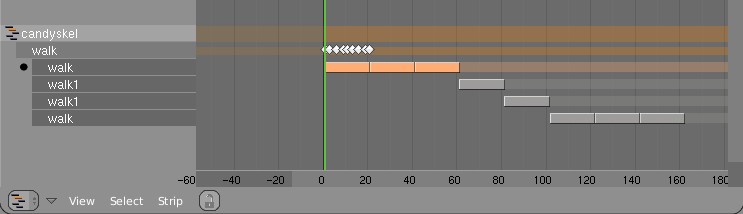
Here's an example edit image for NLA:
http://www.blender.org/bf/nla_match-cycle.jpg
And the animation for it:
http://download.blender.org/demo/test/2.43/0001_0150_match.avi
Blender file:
http://download.blender.org/demo/test/2.43/mancandy_matching.blend

Using this kind of cycling works pretty straightforward, and is a lot
easier to setup than Stride Bones.

To be further tested:
- Blending cycles
- matching rotation for the bones as well.

- ACTION MODIFIERS (motion deformors)

The above option was actually required for this feature. Typically walk
cycles are constructed with certain Bones to be the handles, controlling
for example the torso or feet.
An Action Modifier allows you to use a Curve Path to deform the motion of
these controlling bones. This uses the existing Curve Deformation option.
Modifiers can be added per Action Strip, each controlling a channel (bone)
by choice, and even allows to layer multiple modifiers on top of each other
(several paths deforming motion). This option is using the dependency graph,
so editing the Curve will give realtime changes in the Armature.

The previous walkcycle, controlled by two curves:
http://download.blender.org/demo/test/2.43/0001_0150_deform.avi
Blender file:
http://download.blender.org/demo/test/2.43/mancandy_actiondeform.blend

Action Modifiers can be added in the NLA Properties Panel. Per Modifier you
have to indicate the channel and a Curve Object. You can copy modifiers from
one strip to another using CTRL+C (only copies to active Object strips).

Setting up a correct Curve Path has to be carefully done:
- Use SHIFT+A "Curve Path" in top view, or ensure the path is not rotated.
- make sure the center point of the Curve Object is at the center of the
  Armature (or above)
- move the first point of the curve to the center point as well.
- check if the path starts from this first point, you can change it using
  (in Curve EditMode) the option Wkey -> "Switch Direction"
- Make sure alignment uses the correct axis; if the Armature walks into
  the negative Y direction, you have to set in Object Buttons, "Anim settings"
  Panel, the correct Track option. (Note; option will probably move to the
  Modifier later).

This is a good reason to make such paths automatic (on a command). Is on the
todo list.

Also note this:
- the Curve Path extends in beginning and ending, that's (for now) the default,
  and allows to use multiple paths. Make sure paths begin and end horizontal.
- Moving the Curve in Object Mode will change the "mapping" (as if the landscape
  a character walks over moves). Moving the Curve in Edit Mode will change the
  actual position of the deformation.
- Speed (Ipos) on paths is not supported yet, will be done.
- The Curve "Stretch" deform option doesn't work.
- Modifiers are executed *after* all actions in NLA are evaluated, there's no
  support yet for blending multiple strips with Modifiers.
- This doesn't work yet for time-mapping...

This commit is mostly for review by character animators... some details or
working methods might change.
This feature can also be used for other modifiers, such as noise (Perlin) or
the mythical "Oomph" (frequency control) and of course Python.

Special thanks to Bassam & Matt for research & design help. Have fun!
In a quick glance: (temp image)
http://www.blender.org/bf/rt.png

Main reason is that Lattices are useful a lot for Armature deformation.
Lattices just provide much more precise and interesting control. However,
with only bone envelopes it's very hard to use.

Working with Lattice vertex groups is nearly identical to Mesh:
- on CTRL+P 'make parent' you can choose the deform option now
- In editmode, the buttons to control vertex groups are available
- In outliner you can select vertexgroups too
- Deforming Lattices with Armatures has all options as for Mesh now.

Note:
- No WeightPaint has been added yet. To compensate, the editmode
  drawing for a Lattice with vertex group shows weight values for the active
  vertex group.
- Lattice editmode doesn't undo/redo weight editing yet.
- Softbody for Lattice still uses own vertex weights

Implementation notes:
- derivedmesh weight_to_rgb() is now exported to drawobject.c
- been doing cleanups in code (order of includes, var declarations, etc)
- weightpaint button handling now is generic

I've checked on Brecht's proposal for Custom Element data;
http://mediawiki.blender.org/index.php/BlenderDev/CustomElementData
It could have been used, but that would mean the existing code for
vertexgroup handling and armature deform couldn't be re-used. I guess this
is really a later todo.
a vertex group which will modulate the influence of all bones in the armature.

This commit also tidies up the height of the modifier panels; they should all
have the same size margin now.